Tick & Bell: timers and alarms
Browse the Tick & Bell source on GitHub
Tick & Bell is a native timer and alarm for the Cardputer Zero. It is a worked example to read alongside the guide, not an official M5Stack Store app.
Home menu
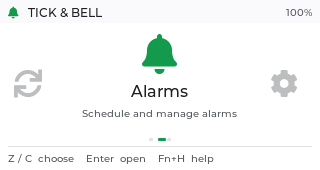
The centered icon and title identify the selected menu. Side icons show nearby choices and the wider dot marks position without relying on color. Left/Right changes the home selection; Up/Down moves through submenu rows. See the shared home menu.
Alarms and sounds
| Next-hour default | Date selector | Sound picker |
|---|---|---|
 |
 |
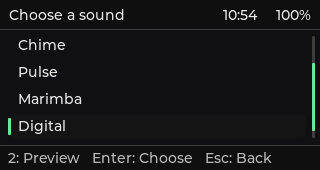 |
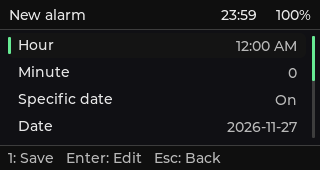
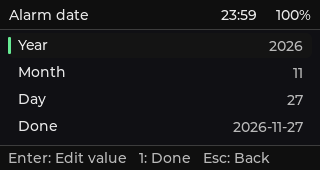
At a simulated 11:59 PM, a new alarm defaults to midnight and advances to the next date. These 320×170 desktop captures use synthetic data; the simulator battery value is not a device measurement.
Where the patterns came from
- Official M5Stack foundation: the pinned CardputerZero Template and LVGL supply rendering, device status and input routing.
- Adapted: NFC Tools provides the center group, side icon lanes, icon sizes and dot placement, along with the header, subtitle and keyboard footer.
- Added here: a reusable header separates the presentation from navigation, so apps bring their own glyphs and labels. A user-session scheduler keeps alarms active after the window closes; it does not wake a powered-off or suspended device.
Clock-core tests cover scheduling and persistence separately from the interface. Simulator captures and native packaging do not substitute for physical keypad, speaker or suspend checks.